
Pin Light – API Reference

By |

Pin Light

The Pin Light is a way to add additional light sources to your game.

Function Description
color()

Returns the color of the Light in RGB (Red, Green, Blue) format.

intensity()

Returns the intensity of the Light.

isRemoved() Returns true if the Light is removed, false if not.
isVisible()

Returns true if the light is visible, false if not.

position()

Returns the Light’s position coordinates relative to its parent.

range()

Returns the range of the Light.

remove()

Remove the light from the Scene.

rotation()

Returns the rotation of the Light in degrees.

rotationQuat()

Returns the rotation of the Light in quaternion.

setColor(color)

Sets the color of the Light.

setIntensity(value)

Sets the intensity of the Light.

setPosition(x, y, z)

Sets the new position relative to the Light’s parent. If the Light has no parent, this sets the world position of the Light.

setRange(value)

Sets the range of the Light.

setRotation(x, y, z)

Sets the rotation value of the Light, in degrees.

setRotationQuat(value)

Sets rotation value in Quaternion.

setVisible(value)

Sets the visibility of the Light; true if the Light is visible, false if not.

setWorldPosition()

Sets the Light’s position coordinates in the world (absolute position).

worldPosition()

Returns the Light’s position coordinates in the world (absolute position).


color()

Returns the Light’s color in RGB (Red, Green, Blue) format. The minimum value is 0 and the maximum is 1 (think of it as the 0-255 scale divided by 255). For example, {r:0, g:0, b:0} is black and {r:1, g:1, b:1} is white.

Returns

Vec3 {x, y, z} color pigment of the Light.

let light = this.scene().findFirst("Pin Light");
log(light.color().x); // result: the red component of the light's color.

↑ Back to top


intensity()

Returns the intensity of the Light.

Returns

number The intensity of the Light. Range is 0-1000.

↑ Back to top


isRemoved()

Returns if the Light is removed.

Returns

boolean true if the Light is removed, false if the Light is not.

↑ Back to top


isVisible()

Returns if the Light is visible.

Returns

boolean true if the Light is visible, false if the Light is not.

↑ Back to top


position()

Returns the Light’s position relative to its parent. If the Light has no parent, the result of this function will be no different than worldPosition.

Returns

Vec3 {x, y, z} relative coordinates of the Light.

↑ Back to top


range()

Returns the range of the Light. The range is how far the light reaches.

Returns

Number The range of the Light.

↑ Back to top


remove()

Remove the Light from the Scene.

↑ Back to top


rotation()

Returns the rotation of the Light in degrees.

Returns

Vec3 The {x, y, z} rotation value of the Light, in degrees.

↑ Back to top


rotationQuat()

Returns the rotation of the Light in Quaternion.

Returns

Quaternion The rotation value in Quaternion.

↑ Back to top


setColor(color)

Sets the color of the Light. Expected range of {r, g, b} is 0-1.

Parameters

Vec3 color – the {r, g, b} color

↑ Back to top


setIntensity(value)

Sets the intensity of the Light.

Parameters

Number value – the intensity of the Light, ranging from 0-1000.

↑ Back to top


setPosition(x, y, z)

Sets the new position relative to the Light’s parent. If the Light has no parent, this sets the world position of the Light.

Parameters

number x – X coordinate in 3D space
number y – Y coordinate in 3D space
number z – Z coordinate in 3D space

↑ Back to top


setRange(value)

Sets the range of the Light.

Parameters

Number value – the range of the Light

↑ Back to top


setRotation(x, y, z)

Sets the rotation value of the Light, in degrees.

Parameters

number x – the X rotation of the Light
number y – the Y rotation of the Light
number z – the Z rotation of the Light

↑ Back to top


setRotationQuat(value)

Sets rotation value in Quaternion.

Parameters

Quaternion value – The Quaternion rotation value to be set

↑ Back to top


setVisible(value)

Sets the visibility of the Light; true if the Light is visible, false if not.

Parameters

boolean value – the visibility of the Light.

↑ Back to top


setWorldPosition(value)

Sets the Light’s position coordinates in the world (absolute position).

Parameters

Vec3 value – the {x, y, z} absolute position of the Light.

↑ Back to top


worldPosition()

Returns the Light’s position coordinates in the world (absolute position).

Returns

Vec3 the {x, y, z} world coordinates of the Light

let pos = this.scene().find("Pin Light")[0].worldPosition();
log('X World Position = ' + pos.x);
↑ Back to top

Did you find this page useful?

Please give it a rating:

Please provide some feedback!

This is very helpful to us.

Tell us how we can improve this post?

AABB – API Reference

By |

AABB

Represents the “axis-aligned bounding box” for the object. These coordinates form a box with the minimum corner at (left, bottom, near) and the maximum corner at (right, top, far). Together this can be used to ascertain the size of the bounding box.

Property Description
max

The Vec3 {right, top, far} maximum value of the AABB.

min

The Vec3 {left, bottom, near} minimum value of the AABB.


max

The Vec3 {right, top, far} maximum value of the AABB.

↑ Back to top


min

The Vec3 {left, bottom, near} minimum value of the AABB.

↑ Back to top

Did you find this page useful?

Please give it a rating:

Please provide some feedback!

This is very helpful to us.

Tell us how we can improve this post?

Vec3 – API Reference

By |

Vec3

The Vec3 class represents a vector in 3D space. Here is how you initialize one and get values from it.

let pos = new Vec3(2, 0, 0);
log(pos); // output: {2, 0, 0}
log(pos.x); // output: 2

Here’s more examples of its usage.

let a = new Vec3(1, 3, 5);
let b = new Vec3(3, 7, 9);
log(a);
let sum = a.add(b); 
let length = a.length();
let sqrLength = a.sqrLength(); //squared length
let normalized = a.normalize();
let diff = a.sub(b);
let dotProduct = a.dot(b);
let crossProduct = a.cross(b);
let distanceBetweenPoints = a.distance(b);

let factor = 2;
let scaled = a.scale(factor); 

let alpha = 0.5;
let lerp = a.lerp(b, alpha); 

let c = new Vec3(101, null, null);
let cxe = c.isXEmpty(); //false
let cye = c.isYEmpty(); //true
let cze = c.isZEmpty(); //true

Did you find this page useful?

Please give it a rating:

Please provide some feedback!

This is very helpful to us.

Tell us how we can improve this post?

Vec2 – API Reference

By |

Vec2

The Vec2 class represents a vector in 2D space. Here is how you initialize one and get values from it.

let pos = new Vec2(0, 1);
log(pos); // output: {0, 1}
log(pos.x); // output: 0

Here’s more examples of its usage.

let a = new Vec2(1, 3);
let b = new Vec2(3, 7);
let sum = a.add(b); 
let length = a.length();
let sqrLength = a.sqrLength(); //squared length
let normalized = a.normalize();
let diff = a.sub(b);
let dotProduct = a.dot(b);
let distanceBetweenPoints = a.distance(b);

let factor = 2;
let scaled = a.scale(factor); 

let alpha = 0.5;
let lerp = a.lerp(b, alpha); 

let pivot = new Vec2(3,1);
let angle = Math.PI/4;
let rotated = rotateByAngle(pivot, angle);

let c = new Vec3(101, null);
let cxe = c.isXEmpty(); //false
let cye = c.isYEmpty(); //true

Did you find this page useful?

Please give it a rating:

Please provide some feedback!

This is very helpful to us.

Tell us how we can improve this post?

Quaternion – API Reference

By |

Quaternion

The Quaternion class represents a quaternion. Quaternions are used to describe rotation in 3D space. Quaternion contains several helpful static functions, which can be called like this: Quaternion.multiply(quat1, quat2). Objects of the Quaternion class have 4 number properties: x, y, z, and w.

Function Description
inverse()

Inverts the quaternion.

toEuler()

Converts from Quaternion to Euler angles (in degrees).

Static Function Description
angle(quat1, quat2)

Returns the angle between two Quaternions.

fromEuler(pitch, yaw, roll)

Converts from Euler angles to Quaternion.

lerp(quat1, quat2, t)

Interpolates between two Quaternions using linear interpolation and returns the result.

lookAt(lookStart, lookEnd)

Returns a Quaternion oriented to the given 3D coordinates.

multiply(quat1, quat2)

Multiplies the given Quaternions and returns the result.

slerp(quat1, quat2, t)

Interpolates between two Quaternions using spherical spline interpolation and returns the result.


inverse()

Inverts the quaternion.

Returns

boolean true if the inversion was successful, false if not

↑ Back to top


toEuler()

Converts from Quaternion to Euler angles (in degrees).

Returns

Vec3 the {x, y, z} yaw, pitch, and roll Euler angles

↑ Back to top


angle(quat1, quat2)

Returns the angle between two Quaternions.

Parameters

Quaternion quat1 – the first Quaternion
Quaternion quat2 – the second Quaternion

Returns

number – the resulting angle

↑ Back to top


fromEuler(pitch, yaw, roll)

Converts from Euler angles to Quaternion.

Parameters

number pitch – the x-axis component
number yaw – the y-axis component
number roll – the z-axis component

Returns

Quaternion the resulting Quaternion

↑ Back to top


lerp(quat1, quat2, t)

Interpolates between two quaternions using linear interpolation and returns the result. Less accurate than slerp() but more efficient. The interpolation curve for linear interpolation between quaternions gives a straight line in quaternion space.

Parameters

Quaternion quat1 – the first Quaternion
Quaternion quat2 – the second Quaternion
number t the interpolation coefficient

Returns

Quaternion the resulting Quaternion

↑ Back to top


lookAt(lookStart, lookEnd)

Returns a Quaternion oriented to the given 3D coordinates.

Parameters

Vec3 lookStart – the first set of 3D coordinates
Vec3 lookEnd – the second set of 3D coordinates

Returns

Quaternion – the resulting Quaternion

let _target;

function start(){
    _target = this.scene().findFirst("Cube");
}

function update(dt){
    // rotate the projectile to face the target
    let currentQuat = this.entity().rotationQuat();
    let nextQuat = Quaternion.lookAt(this.entity().position(), _target.position());
    nextQuat = Quaternion.slerp(currentQuat, nextQuat, 0.5);
    this.entity().setRotationQuat(nextQuat);

    // move the projectile toward the target in an arcing movement
    let mat = Mat4.createRotation(nextQuat);
    let forward = Mat4.transformPoint(mat, new Vec3(1, 1, -1));
    let curPos = this.entity().position();
    this.entity().setPosition(
        curPos.x + 0.1 * forward.x,
        curPos.y + 0.1 * forward.y,
        curPos.z + 0.1 * forward.z);
}

↑ Back to top


multiply(quat1, quat2)

Multiplies the given Quaternions and returns the result.

Parameters

Quaternion quat1 – the first Quaternion
Quaternion quat2 – the second Quaternion

Returns

Quaternion – the resulting Quaternion

↑ Back to top


slerp(quat1, quat2, alpha)

Interpolates between two Quaternions using spherical spline interpolation and returns the result. More accurate than lerp() but less efficient. Spherical spline interpolation provides smooth transitions between different orientations and is often useful for animating models or cameras in 3D.

Parameters

Quaternion quat1 – the first Quaternion
Quaternion quat2 – the second Quaternion
number t the interpolation coefficient

Returns

Quaternion the resulting Quaternion

↑ Back to top

Did you find this page useful?

Please give it a rating:

Please provide some feedback!

This is very helpful to us.

Tell us how we can improve this post?

OBB – API Reference

By |

OBB

The OBB class represents an “oriented bounding box” for an object. OBB is more precise but more performance-heavy than AABB. The list below isn’t of functions but properties, so you can call them like this: this.entity().worldOBB().center

Property Description
center

Vec3 the {x, y, z} center of the OBB

extents

Vec3 the {x, y, z} extents of the OBB

xAxis

Vec3 the x-axis orientation axes

yAxis

Vec3 the y-axis orientation axes

zAxis

Vec3 the z-axis orientation axes


center

Vec3 the {x, y, z} center of the OBB

↑ Back to top


extents

Vec3 the {x, y, z} extents of the OBB

↑ Back to top


xAxis

Vec3 the x-axis orientation axes

↑ Back to top


yAxis

Vec3 the y-axis orientation axes

↑ Back to top


zAxis

Vec3 the z-axis orientation axes

↑ Back to top

Did you find this page useful?

Please give it a rating:

Please provide some feedback!

This is very helpful to us.

Tell us how we can improve this post?

Mat4 – API Reference

By |

Mat4

The Mat4 class represents a 4×4 matrix. Mat4 contains several helpful static functions, which can be called like this: Mat4.createRotation(quat)

Property Description
arr

The array that represents the matrix.

Function Description
rotate(x, y, z, angle)

Post-multiplies this matrix by the matrix corresponding to the specified rotation about the specified axis.

scale(x, y, z)

Post-multiplies this matrix by the matrix corresponding to the specified scale transformation.

translate(x, y, z)

Post-multiplies this matrix by the matrix corresponding to the specified translation.

Static Function Description
createIdentity()

Creates and returns a 4×4 identity matrix.

createOrthographic(left, right, bottom, top, near, far)

Creates an orthographic projection transformation matrix. The parameters form a rectangular cuboid that defines the visible area of rendering.

createRotation(quat)

Creates a rotation matrix based on the given Quaternion.

createTranslation(x, y, z)

Creates a translation matrix based on the given x, y, z coordinates.

inverse(matrix)

Returns the inverse of the given matrix.

multiply(matrix1, matrix2)

Multipies the given matrices together.

transformPoint(matrix, vector)

Transforms the specified point by this matrix, and returns the result.

transformVector(matrix, vector)

Transforms the specified vector by this matrix by treating the fourth (w) coordinate as zero, and returns the result.


arr

array – the array that represents the matrix

↑ Back to top


rotate(x, y, z, angle)

Post-multiplies this matrix by the matrix corresponding to the specified rotation about the specified axis.

Parameters

number x – the x-axis to rotate about
number y – the y-axis to rotate about
number z – the z-axis to rotate about
number angle – the angle of the rotation (radians)

↑ Back to top


scale(x, y, z)

Post-multiplies this matrix by the matrix corresponding to the specified scale transformation.

Parameters

number x – the amount to scale along the x-axis
number y – the amount to scale along the y-axis
number z – the amount to scale along the z-axis

↑ Back to top


translate(x, y, z)

Post-multiplies this matrix by the matrix corresponding to the specified translation.

Parameters

number x – the amount to translate along the x-axis
number y – the amount to translate along the y-axis
number z – the amount to translate along the z-axis

↑ Back to top


createIdentity()

Creates and returns a 4×4 identity matrix.

Returns

Mat4 matrix – A new identity matrix

↑ Back to top


createOrthographic(left, right, bottom, top, near, far)

Creates an orthographic projection transformation matrix. The parameters form a rectangular cuboid that defines the visible area of rendering.

Parameters

number left – farthest left on the x-axis
number right – farthest right on the x-axis
number bottom – farthest down on the y-axis
number top – farthest up on the y-axis
number near – closest on the z-axis
number far – furthest on the z-axis

Returns

Mat4 – the resulting orthographic projection matrix

↑ Back to top


createRotation(quat)

Creates a rotation matrix based on the given Quaternion.

Parameters

Quaternion quat – the Quaternion representation of the rotation

Returns

Mat4 – the resulting rotation matrix

↑ Back to top


createTranslation(x, y, z)

Creates a translation matrix based on the given x, y, z coordinates.

Parameters

number x – the translation on the x-axis
number y – the translation on the y-axis
number z – the translation on the z-axis

Returns

Mat4 – the resulting translation matrix

↑ Back to top


inverse(matrix)

Returns the inverse of the given matrix.

Parameters

Mat4 matrix – the matrix to be inverted

Returns

Mat4 – the inverted matrix

↑ Back to top


multiply(matrix1, matrix2)

Multipies the given matrices together.

Parameters

Mat4 matrix1 – the first matrix to multiply
Mat4 matrix2 – the second matrix to multiply

Parameters

Mat4 – the resulting matrix

↑ Back to top


transformPoint(matrix, point)

Transforms the specified point by this matrix, and returns the result.

Parameters

Mat4 matrix – the transformation matrix
Vec3 point – the point to transform

Returns

Vec3 – the transformed point

↑ Back to top


transformVector(matrix, vector)

Transforms the specified vector by this matrix by treating the fourth (w) coordinate as zero, and returns the result.

Parameters

Mat4 matrix – the transformation matrix
Vec3 vector – the vector to transform

Returns

Vec3 – the transformed vector

↑ Back to top

Did you find this page useful?

Please give it a rating:

Please provide some feedback!

This is very helpful to us.

Tell us how we can improve this post?

EasingFunctions – API Reference

By |

EasingFunctions

EasingFunctions is a helper class with a collection of easing functions. Easing functions are used to calculate interpolation to create an animation.

These functions take a value from 0 to 1 representing how far into the animation you are (0 = beginning, 1 = end). Think of this as the “percent complete”. You can use easing functions in an update loop to update your object every frame. The Animation action nodes have all this set up for you already.

This is a simplified example of how we use EasingFunctions in a position animation node. This example makes my entity fall to position {0, 0, 0} with a bounce out animation.

let duration = 5;               // length of the animation in seconds
let phaseT = 0;                 // how far into the animation we are (percentage complete)
let target = new Vec3(0, 0, 0); // the ending position of my object
let done = false;               // flag to detect when to stop animating

let animObj;                    // the object we're animating
let startPos;                   // our object's initial position

function start(){
	animObj = this.entity();
	startPos = animObj.position();
}

function update(dt) {
	if (done) return; // don't run this code if the animation is complete
	phaseT += dt / duration; // calculate the time difference since the last update call
	phaseT = Math.min(phaseT, 1); // don't allow the percentage complete to go over 100%

	// Pass the percentage complete into the EasingFunction, 
	// which will return the factor we need to multiply by to
	// find our target position for this frame:
	let anim = EasingFunctions.outBounce(phaseT); 

	// determine the new position based on the starting position, target position, and animation factor:
	let aPos = new Vec3;
	aPos.x = startPos.x * (1 - anim) + target.x * anim;
	aPos.y = startPos.y * (1 - anim) + target.y * anim;
	aPos.z = startPos.z * (1 - anim) + target.z * anim;

	// set the new position
	animObj.setPosition(aPos.x, aPos.y, aPos.z);

	if (phaseT == 1) {
		// if we reach 100% complete, set the flag to stop running the animation code
		done = true;
	}
}


Supported Easing Functions

Here is a website with graphs of all the easing functions, for visualization.

EasingFunctions = {
    linear
    inQuad
    outQuad
    inOutQuad
    inCube
    outCube
    inOutCube
    inQuart
    outQuart
    inOutQuart
    inQuint
    outQuint
    inOutQuint
    inSine
    outSine
    inOutSine
    inExpo
    outExpo
    inOutExpo
    inCirc
    outCirc
    inOutCirc
    inBack
    outBack
    inOutBack
    inBounce
    outBounce
    inOutBounce
    inElastic
    outElastic
    inOutElastic
}

Did you find this page useful?

Please give it a rating:

Please provide some feedback!

This is very helpful to us.

Tell us how we can improve this post?

Event – API Reference

By |

Event

The Event class allows you to fire (broadcast) global events and subscribe to them. Here’s an example:

//// SENDER
let data = true; // this could be any value
eventName = "Some Name";
Event.fire(eventName, data);

//// RECEIVER
let SNCallback = function(data){
  log("callback: " + data);
};

function start(){
  Event.addListener("Some Name", SNCallback);
}
function onRemove(){
  Event.removeListener("Some Name", SNCallback);
}

Did you find this page useful?

Please give it a rating:

Please provide some feedback!

This is very helpful to us.

Tell us how we can improve this post?

Bounce Node – Buildbox 3 Manual

By |

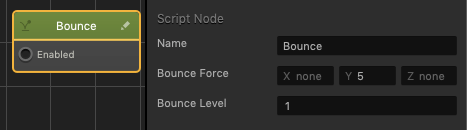
Bounce Node

This movement node quickly moves an asset into the specified direction, and once the asset reaches the specified height as determined by the Bounce Force, it will fall back to its starting point.

Option Description
Name Type a custom name for this node, if needed.
Bounce Force Enter a numeric value in the desired axis fields to specify the direction and distance the asset will bounce. For example, a value of 5 for the Y axis will result in the asset bouncing up vertically.
Bounce Level Enter a numeric value to specify the height that the asset must be under in order to bounce again.
If the asset is above this value, it will not be able to bounce again until it falls back under this value.

If needed, you can also customize this node. For details, see Customizing Nodes.