
Set Physics Node
This action node changes the physics settings on an asset. This will override the physics settings on the start node.
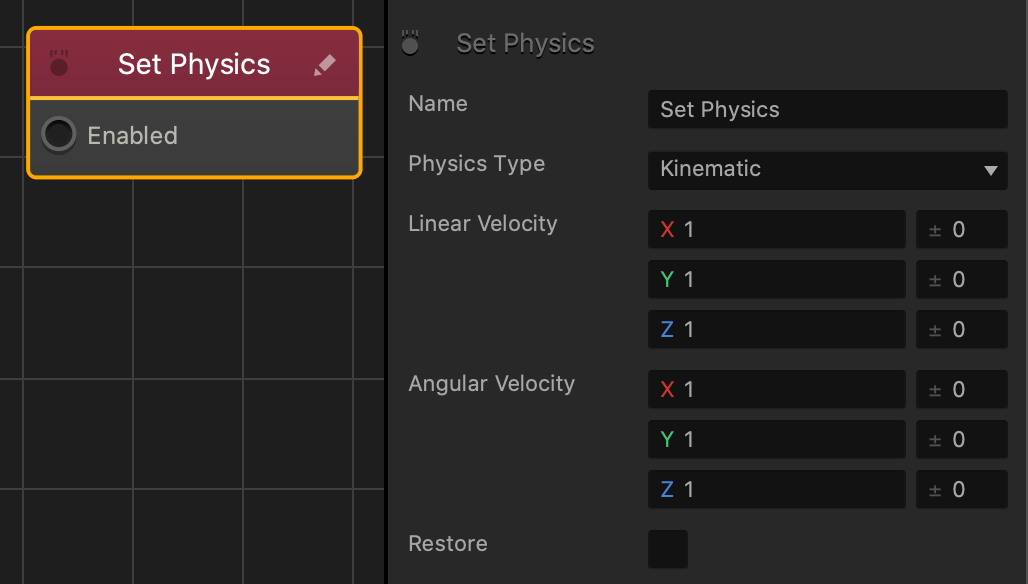
| Option | Description |
| Name | Type a custom name for this node, if needed. |
| Physics Type | Select the type of physics to define the motion of the selected asset and its collision shape:
|
| Linear Velocity | Affects the level of movement along each axis when affected by gravity and colliding with other objects.
Enter a range value on the right to make the asset pick a random axis value.
|
| Angular Velocity | Affects the level of rotation along each axis when affected by gravity and colliding with other objects. Enter a range value on the right to make the asset pick a random axis value. |
| Restore | Select to revert the asset back its original physics settings, when this node is no longer active. |
If needed, you can also customize this node. For details, see Customizing Nodes.


