
DAY 9, 10 & 11

LESSON GOAL:
Create Your Scenes
Building The Core of Your Game
Now it’s time to get serious.
What is truly going to make or break your game is what happens over the next few days. This is the longest lesson in the full 30 day challenge and also the most important.
We’ve mentioned it enough to be treading dangerously on “broken record” territory, but just in case it’s not clear, we strongly recommend you make an endless game. Three days is more than enough time to create the scenes needed for an endless game, but it’s just scratching the surface for making a full-on leveled game.
Speaking of endless scenes… how many should you make? We recommend 25 for a simple endless game, 50 for a medium one and 75 for a fairly complex endless game. Once you get in the groove, making scenes will only take you 1-5 minutes per scene. In this lesson we’ll show you how to do it efficiently while keeping a pretty fast speed.
Lesson Steps:
STEP 1
STEP 2
STEP 3
Create Your Scene Gameplan
Even though this lesson is important, don’t worry, it’s actually not that difficult. We’re going to start by building out a gameplan to follow for our scene creation and the first thing you’ll need to do is pick a few target games to loosely base your plan on.
For instance, if you are making a running game, then Canabalt would be a great target game. If you are making a jumping game, then Doodle Jump would be a good target game. If you were creating an impossible game type, then The Impossible Game might be a good target.
Now the last thing we recommend you do is ever copy someone’s game exactly. We are not fans of cloning, reskins or anything of the sort. Instead we want you to study your target game to figure out what makes it great, and then “model and improve” these ideas into your own unique game.
When designing your scenes, a big one to think about is difficulty. Do people like Doodle Jump because it truly rides the line of easy and difficult? How long does the average game last? Do you typically die because of lack of skill or frustrating controls?
What makes this game tick.
Jot down a list of these important items about your target game. For instance you might have:
- Fast gameplay
- Average life about 2 minutes
- Sloppy control, makes it harder
- Crazy power-ups
- Starts easy, gets hard quick
When you are finished, cross out what annoys you and add in what you wish the target game had. Build out your ultimate game by quickly jotting down what you think would make the target game better.
Now to be clear, your final game won’t be exactly like this list. You might even add a function that Buildbox can’t do. The idea isn’t to build out exactly what your game will be, it’s to give your game a backbone. We want to have an idea of what this game is going to be like and also have a list to refer to if we ever hit a stint of writers block.
Make Your Base Scene
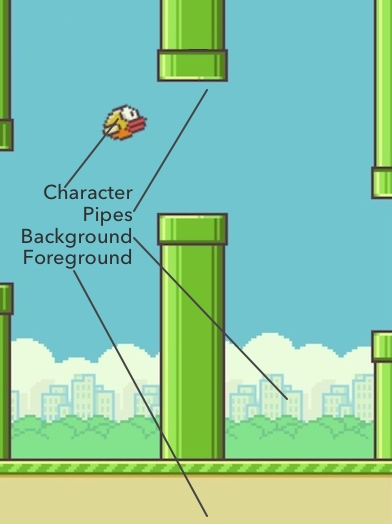
Now it’s time to make a template scene we call a base scene. This is a single scene that will be the basis for all your future scenes. For example, let’s discuss the base scene in Flappy Birds.
What is arguably the biggest game of 2014 literally has only 4 elements in the whole entire game: a character, a simple background, a foreground and then pipes as enemies. Don’t think your base scene (or any scene) has to be complex to be fun.
What is your base scene going to look like? If you’re going to have a game where the main character walks on the ground and has to avoid mushroom monsters, then build out the most simple version of this scene as Scene 1
(Protip: Don’t make your base scene your start scene. Instead, keep your start scene extremely simple, under 400 px and without any enemies. This ensures your players can start each game without any trouble and also allows you to easily test your different levels later on).
Open up Buildbox and start throwing in ideas for your base scene. Once you’re done creating this scene, it’s time to step into the assembly line.
Setup The Scene Assembly Line
Now that you’ve got a basic gameplan for your game and a base scene, it’s time to expand.
As you’ll see in this video, it’s really not that hard:
- Make about 10 copies of your base scene
- Create scenes based on your gameplan
- If you get stuck, come up with a simple gameplay idea and create many scenes around it (ex. avoid the blocks or jump the canyon)
- Create 25-75 scenes depending on how detailed you want to go
- Don’t worry about power-ups or effects yet, we’ll do that soon :)
In the video above, Trey walks through the fast creation of a base scene and then shows you how he expands this out in the assembly line. An important thing to remember is this: it’s important to move quickly and tweak later. You can always go back and change things, so don’t get bogged down in the details.
The next lesson is going to also last for multiple days and this one will be about Power-Ups and Effects. Since this is a pretty deep rabbit hole in itself, we advise you to spend the next few days solely focusing on building these scenes.
Try to create 25-75 scenes (depending on how complex your game is) and we’ll tweak these scenes and add in cool effects soon.
Also, don’t forget we have a full set of 25 tutorial videos about buildbox available. You can find out how most all scene editor features work in the tutorial section.
30 Day Game Challenge Lessons:
Week 1 – Game Ideas & Basic Training
Week 2 – Creating Your Game
- Day 8 – Your Game Name
- Day 9, 10, 11 – Creating Your Scenes
- Coming Soon
Week 3 – Monetization & Setup
- Coming Soon
Week 4 – The Launch
- Coming Soon
 Know someone who might like to do the challenge with you?
Send them over to the challenge page so they can download Buildbox too:
www.buildbox.com/challenge/


