

TODAY’S GOAL:
Export Your Game
Roll it out…
Now it’s time to export the final version of your game.
Even though this might not seem like much, it’s actually extremely important to do this in a timely manner because when the challenge completes you will not be able to export your game unless you purchase the full version of Buildbox.
Our goal with this challenge is for you to create your first game for free, so we want to encourage you to export the best version of your game in every available platform before the trial ends. Even if you don’t plan on submitting to all of them immediately, you might need them later!
Lesson Steps
STEP 1
STEP 2
STEP 3
Finalize Your Game
The first step you’ll need to take is finalizing your game. If you’ve been following along with the challenge so far, then most likely you did this when reviewing the checklist in the last lesson, but if you are behind, now is a great time to catch up.
Remember, if you still need to make levels and create the basics of your game, make it as simple as possible! Very simple games have done extremely well in the app store.
Export All Available Platforms
When your game is ready, exporting is extremely easy.
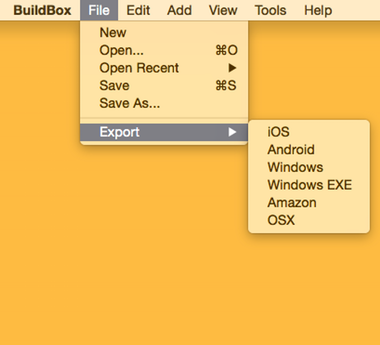
Just click on “File” from the main Buildbox menu (like pictured above) and then choose “Export >”. You’ll then see a list of export options, we recommend exporting for all of them!
Do keep in mind that some features might want to be taken out for certain gameplay types. For example, you don’t have to have an on screen button to move your character if you are exporting to PC, Mac or Amazon TV.
Important: All export options besides Windows EXE export raw source code that needs to be compiled. We’ll discuss compiling code in the next lesson, for now it’s important to simply export all the platforms. Windows EXE export allows you to instantly export an EXE that can run on any Windows computer. This is a great way to share your game with friends!
Go export the source code for all platforms now so you’ll have them for later if needed.
Prepare For Uploading
If you haven’t already started signing up for app store accounts, then do so ASAP.
Below is a list of just some of the different App Stores you can upload Buildbox games too, but we recommend starting with the Apple App Store and Google Play Store.
iOS:
Android
Amazon
- Amazon App Store (Also works for Amazon TV)
Mac
PC
30 Day Game Challenge Lessons:
Week 1 – Game Ideas & Basic Training
Week 2 – Creating Your Game
Week 3 – Monetization & Setup
- Day 15-16 – In App Purchases
- Day 17-18 – Ad Companies
- Day 19 – Game Checklist
- Day 20 – Exporting Your Game
- Coming Soon
Week 4 – The Launch
- Coming Soon
 Know someone who might like to do the challenge with you?
Send them over to the challenge page so they can download Buildbox too:
www.buildbox.com/challenge/


