
TODAY’S GOAL:
Choose Ad Networks
The Most Lucrative Option?
You’ve probably heard a ton about In App Purchases in the news and online, but did you know it’s not typically most lucrative option? This might come as a surprise since you hear so much discussion about In App Purchases online and in the news, but most of our customers (and indie developers in general) make more money from ads than In App Purchases… especially if they are on mobile.
In this lesson you have two days to decide what ad networks you want to use, sign up for them and then put them into your Buildbox games. The good news is this is extremely simple and shouldn’t take more than 30 minutes to an hour to complete.
Lesson Steps
STEP 1
STEP 2
STEP 3
Choose Which Ad Networks To Use
Recently Trey’s hit game Phases crossed the 2,000,000 download mark. Even though Phases had In App Purchases, the vast majority of the game was monetized using Ads.
Enter Trey to explain which ones he used and why:
“We actually used Admob as the main ad entry for Phases. We had a pop-up Admob ad showing every 7 times a character died. We also had an iads/admob banner that showed up on the game over screen. We originally were tested showing a big ad every 5 times a user died, but it was too annoying for the users.
It’s important to remember these are real people playing your game and you need to make sure you’re developing a good relationship with them. There is nothing wrong with putting ads in your game, but don’t overdue it.”
AD TYPES
In Buildbox there are two different ad types, banners and interstitials. Interstitial is just a fancy word for full screen pop-up, and while they make the most money, they’re also the most annoying. You’ll want to use these sparingly (like maybe once when they open the game and then after every 5-10 game over screens).
AD COMPANIES
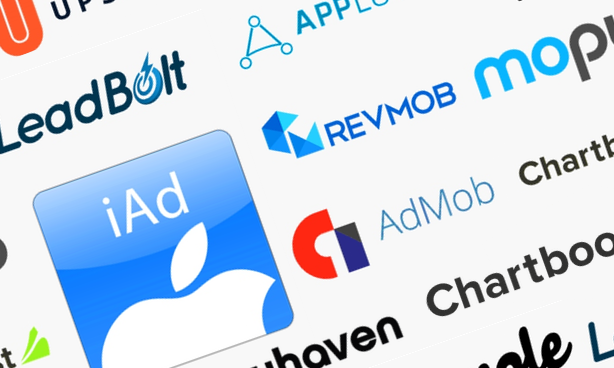
Buildbox support a wide range of ad companies including:
All of these ad companies have their pros and cons. Also, each company seems to have it’s period where it does better than the others. By doing some Google research you’ll find many people talking about which ad companies they are using and their current eCPM (eCPM is the common measurement people use to determine how good an ad company is doing. The higher the better).
To help you get started, here’s some fast opinions from the Buildbox team:
“On the interstitial front, we find that Admob performs the best when you have a lot of international traffic outside the US. If you are mainly US based then Chartboost typically performs very well. Both are great consistent platforms. Leadbolt, Vungle and AppLovin can also have some surprisingly high eCPMs out of nowhere.
If it all seems overwelming, then just start with Admob. They are owned by Google and make the sign-up process very simple.
For banners we typically use iAds first with iOS games and have Admob in there as a backup.”
It’s worth noting that these ad networks are currently only on mobile devices. Ads for Mac, Windows and microconsoles haven’t been implemented at the time of this writing.
Setup Ad Network Accounts
After you’ve chosen an ad network (or ad networks) to use in your game, it’s time to setup accounts with them. After all, we have to make sure we get paid after we start generating revenue!
This is very easy to do, the links below will take you to the account sign-up page for each of the ad networks, simply follow their directions to setup your account:
- iAds Register
- Admob Register
- Applovin Register
- Vungle Register
- LeadBolt Register
- Revmob Register
- Mopub Register
- Chartboost Register
- Playhaven Register
Once you’ve registered, you’ll need to add your game to the ad network and retreive your Ad Key (sometimes called an API Key) from the Ad company.
This is different, but not difficult, for every ad company.
If you need specific help with an ad company try checking youtube for tutorial videos or the ad networks help section. This is not a hard process, typically you’ll just click a “new app” or “new ad” button on the dashboard.
Setup The Ads In Your Game
Setting up ad networks in Buildbox is super simple.
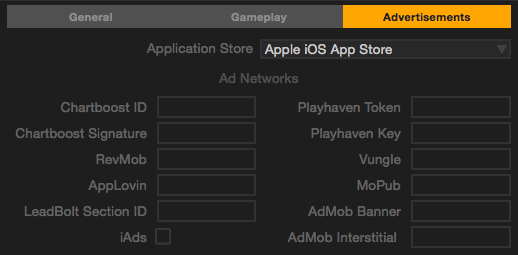
First open up your settings and click on “Advertisements”. Here you’ll enter your App ID (sometimes called an App API Key) from each Ad network that you want to use in your game:
Now head over to the Menu Editor, then highlight the menu screen you would like to put your ad on. This can be the Main Menu, Shop, Info Screen, Pause Menu, Game Over Screen, End Screen (when someone completes your game), or even the Game Field, but we don’t recommend placing ads there as it will surely annoy users!
After you highlight the menu or screen you want to place ads on, you’ll see the following options under the advanced options section (click the advanced options button if it’s not shown):
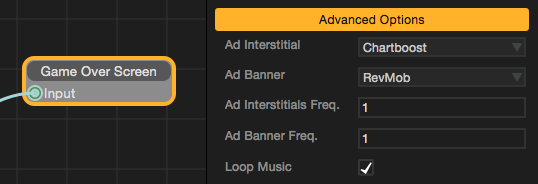
Here you can choose what companies you use for your Interstitial (full screen) ads and your banners. For each ad type you can choose the frequency. This will allow you to show your add every X amount of times a user comes to this screen.
(ProTip: If you choose iAds for Ad Banner and also have entered in an Ad Mob ID in the Ad Settings screen, then we’ll implement a fail over automatically! This means if iAds doesn’t show, we’ll automatically try and show Admob. Please note, this failover option is only available through these two networks in that order).
30 Day Game Challenge Lessons:
Week 1 – Game Ideas & Basic Training
Week 2 – Creating Your Game
Week 3 – Monetization & Setup
- Day 15-16 – In App Purchases
- Day 17-18 – Ad Companies
- Coming Soon
Week 4 – The Launch
- Coming Soon
 Know someone who might like to do the challenge with you?
Send them over to the challenge page so they can download Buildbox too:
www.buildbox.com/challenge/


